外贸网站建设,让业务全球可达
0%
从网站日志中看,类似下面的访问日志:
74.7.227.175 - - [27/Nov/2025:12:24:33 +0800] "GET /anshun/seosem/236.html HTTP/1.1" 403 146 "-" "Mozilla/5.0 AppleWebKit/537.36 (KHTML, like Gecko; compatible; GPTBot/1.3; +https://openai.com/gptbot)"
74.7.227.175 - - [27/Nov/2025:12:24:35 +0800] "GET /gaoyou/seosem/199.html HTTP/1.1" 403 146 "-" "Mozilla/5.0 AppleWebKit/537.36 (KHTML, like Gecko; compatible; GPTBot/1.3; +https://openai.com/gptbot)"
185.191.171.5 - - [27/Nov/2025:12:24:35 +0800] "GET /zhangshu/zxxq/ HTTP/1.1" 200 6957 "-" "Mozilla/5.0 (compatible; SemrushBot/7~bl; +http://www.semrush.com/bot.html)"
34.227.156.153 - - [27/Nov/2025:12:24:35 +0800] "GET /bayannaoer/News1/ HTTP/1.1" 200 8587 "-" "Mozilla/5.0 AppleWebKit/537.36 (KHTML, like Gecko; compatible; Amazonbot/0.1; +https://developer.amazon.com/support/amazonbot) Chrome/119.0.6045.214 Safari/537.36"
74.7.227.175 - - [27/Nov/2025:12:24:36 +0800] "GET /shuifu/seosem/208.html HTTP/1.1" 403 146 "-" "Mozilla/5.0 AppleWebKit/537.36 (KHTML, like Gecko; compatible; GPTBot/1.3; +https://openai.com/gptbot)"
74.7.227.175 - - [27/Nov/2025:12:24:38 +0800] "GET /rushan/seosem/199.html HTTP/1.1" 403 146 "-" "Mozilla/5.0 AppleWebKit/537.36 (KHTML, like Gecko; compatible; GPTBot/1.3; +https://openai.com/gptbot)"
44.197.76.210 - - [27/Nov/2025:12:24:39 +0800] "GET /pizhou/shenzhenwangzhanjianshegongsi_3/ HTTP/1.1" 200 8799 "-" "Mozilla/5.0 AppleWebKit/537.36 (KHTML, like Gecko; compatible; Amazonbot/0.1; +https://developer.amazon.com/support/amazonbot) Chrome/119.0.6045.214 Safari/537.36"
74.7.227.175 - - [27/Nov/2025:12:24:39 +0800] "GET /hainan/seosem/207.html HTTP/1.1" 403 146 "-" "Mozilla/5.0 AppleWebKit/537.36 (KHTML, like Gecko; compatible; GPTBot/1.3; +https://openai.com/gptbot)"
74.7.227.175 - - [27/Nov/2025:12:24:41 +0800] "GET /putian/seosem/200.html HTTP/1.1" 403 146 "-" "Mozilla/5.0 AppleWebKit/537.36 (KHTML, like Gecko; compatible; GPTBot/1.3; +https://openai.com/gptbot)"
74.7.227.175 - - [27/Nov/2025:12:24:43 +0800] "GET /tainan/seosem/239.html HTTP/1.1" 403 146 "-" "Mozilla/5.0 AppleWebKit/537.36 (KHTML, like Gecko; compatible; GPTBot/1.3; +https://openai.com/gptbot)"
74.7.227.175 - - [27/Nov/2025:12:24:44 +0800] "GET /laibin/seosem/238.html HTTP/1.1" 403 146 "-" "Mozilla/5.0 AppleWebKit/537.36 (KHTML, like Gecko; compatible; GPTBot/1.3; +https://openai.com/gptbot)"
3.213.106.226 - - [27/Nov/2025:12:24:44 +0800] "GET /yantai/News_90/ HTTP/1.1" 200 9076 "-" "Mozilla/5.0 AppleWebKit/537.36 (KHTML, like Gecko; compatible; Amazonbot/0.1; +https://developer.amazon.com/support/amazonbot) Chrome/119.0.6045.214 Safari/537.36"
74.7.227.175 - - [27/Nov/2025:12:24:46 +0800] "GET /yunnan/seosem/205.html HTTP/1.1" 403 146 "-" "Mozilla/5.0 AppleWebKit/537.36 (KHTML, like Gecko; compatible; GPTBot/1.3; +https://openai.com/gptbot)"
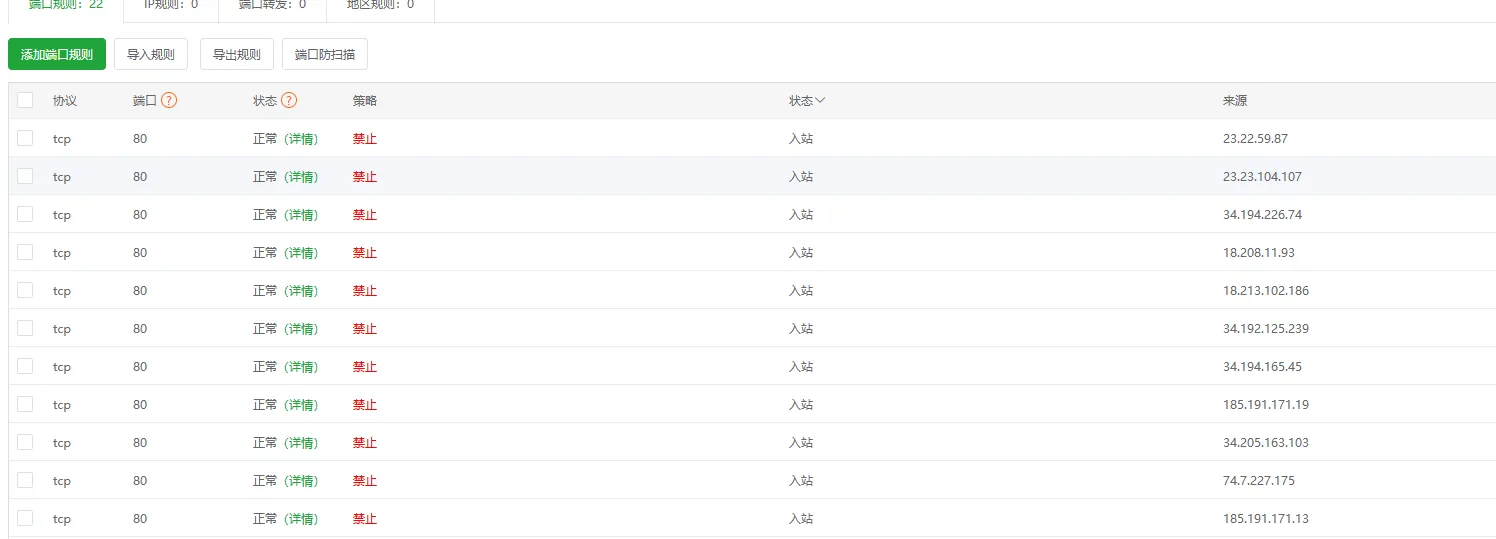
既然我们在防火墙中添加了这些IP到黑名单中,但是这些IP依旧可以访问到NGINX,
74.7.227.175
多次请求不同的 /seosem/xxx.html 页面
UA 显示为 GPTBot/1.3
每次返回状态码 403(说明已被 Nginx 拒绝,但仍在不断尝试访问)
185.191.171. 系列*
如 185.191.171.13、185.191.171.19
UA 显示为 SemrushBot(SEO 爬虫)
多次访问不同的新闻页面
34. 系列(Amazon AWS 节点)*
如 34.205.163.103、34.192.125.239、34.194.165.45、34.194.226.74
UA 显示为 Amazonbot
多次访问不同的目录页面
18. 系列(Amazon AWS 节点)*
如 18.208.11.93、18.213.102.186
UA 显示为 Amazonbot
多次访问不同的新闻页面
23. 系列(Amazon AWS 节点)*
如 23.23.104.107、23.22.59.87
UA 显示为 Amazonbot
多次访问不同的新闻页面
最频繁的重复 IP:74.7.227.175(GPTBot),几乎在每秒都尝试访问不同页面。
常见爬虫 IP:185.191.171.*(SemrushBot)、34.*、18.*、23.*(Amazonbot)。
这些都是典型的 搜索引擎爬虫或机器人,其中 GPTBot 已被拒绝(403),但仍会出现在日志里
也就是说其实网站并没有什么访问量,但是由于GTP和一些蜘蛛爬虫不停地访问网站,造成服务器资源过渡使用,而产生资源不足。
解决方案:
在 Linux 服务器上执行以下命令(需要 root 权限):
# 封禁 GPTBot 的 IP
iptables -A INPUT -s 74.7.227.175 -j DROP

# 封禁 SemrushBot 的 IP 段
iptables -A INPUT -s 185.191.171.13 -j DROP
iptables -A INPUT -s 185.191.171.19 -j DROP

# 封禁 Amazonbot 的 IP 段
iptables -A INPUT -s 34.205.163.103 -j DROP
iptables -A INPUT -s 34.192.125.239 -j DROP
iptables -A INPUT -s 34.194.165.45 -j DROP
iptables -A INPUT -s 34.194.226.74 -j DROP
iptables -A INPUT -s 18.208.11.93 -j DROP
iptables -A INPUT -s 18.213.102.186 -j DROP
iptables -A INPUT -s 23.23.104.107 -j DROP
iptables -A INPUT -s 23.22.59.87 -j DROP
添加完成后记得保存并重载规则:
service iptables save
systemctl restart iptables
如果你用的是 firewalld:
firewall-cmd --permanent --add-rich-rule="rule family=ipv4 source address=74.7.227.175 reject"
firewall-cmd --reload
在 宝塔面板 → 安全 → 防火墙 中,逐条添加以下规则:
| 来源 IP | 动作 | 协议 | 端口 |
|---|---|---|---|
| 74.7.227.175 | 拒绝 | ALL | ALL |
| 185.191.171.13 | 拒绝 | ALL | ALL |
| 185.191.171.19 | 拒绝 | ALL | ALL |
| 34.205.163.103 | 拒绝 | ALL | ALL |
| 34.192.125.239 | 拒绝 | ALL | ALL |
| 34.194.165.45 | 拒绝 | ALL | ALL |
| 34.194.226.74 | 拒绝 | ALL | ALL |
| 18.208.11.93 | 拒绝 | ALL | ALL |
| 18.213.102.186 | 拒绝 | ALL | ALL |
| 23.23.104.107 | 拒绝 | ALL | ALL |
| 23.22.59.87 | 拒绝 | ALL | ALL |
iptables/防火墙层面封禁 → 请求不会再进入 Nginx,日志里也不会出现。
建议先观察一段时间,确认这些 IP 确实是恶意或无用爬虫,再批量封禁。